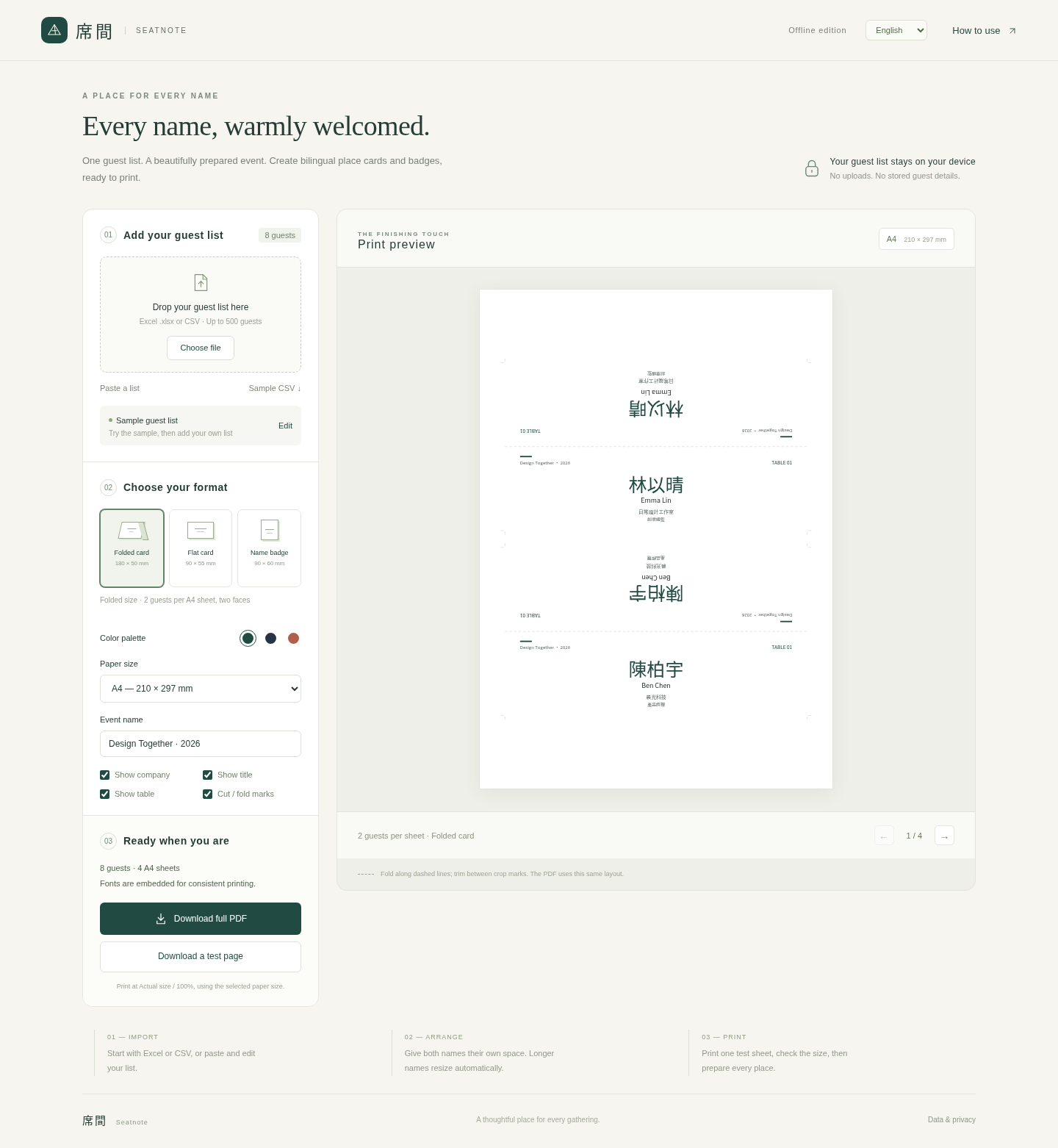
Folded place card
180 × 50 mm folded · 180 × 100 mm flat
2 guests per sheetSMALL DETAILS. A WARM WELCOME.
Turn your guest list into neatly arranged bilingual place cards and badges. A downloadable desktop tool for the people bringing everyone together.
Initial release · US$9.99 one-time
Digital ZIP download. Payment and delivery by Lemon Squeezy.
FROM LIST TO TABLE
For office administrators, workshop hosts and event planners who already have the names—and need the cards.
Import Excel, CSV or TSV, or paste spreadsheet cells. Match the name, second name, company, title and table columns. Review and edit before exporting.
Choose a folded card, flat card or badge, then A4 or US Letter paper. Use one name or two; preview the layout and resolve any reported text issues.
Export a test page first. Print at Actual size / 100%, check the measurements, then export your full PDF. Cut and fold using the optional guides.
THREE USEFUL FORMATS
Fixed sizes keep the workflow simple. All three formats work on A4 or US Letter.
180 × 50 mm folded · 180 × 100 mm flat
2 guests per sheet90 × 55 mm
8 guests per sheet90 × 60 mm
8 guests per sheetFor plain paper or suitable printable cardstock that you cut yourself. Measure holders first. This is not a template for a specific precut label or card stock.
A TOOL TO KEEP AT HAND
Seatnote is original downloadable software, not a design or printing service. The ZIP contains Seatnote.html, an English / Traditional Chinese getting-started guide, sample data and license notices. No physical product is shipped.
The tool is designed to open from the extracted HTML file on your computer and process guest lists locally, without an app account. Keep the original spreadsheet: refreshing or closing the tool clears your list and edits.
One person or one organization, for repeated events and paid client work. You may keep backups and give finished PDFs and printed cards to clients. Redistribution or resale of the software is not included. Read the licence and refund terms.
Offline operation and PDF generation have passed controlled tests in desktop Chromium. Opening the extracted HTML directly from a computer has not yet been verified, and physical printing has not been tested. Current desktop Chrome and Edge are the intended browsers; Safari, Firefox, mobile file viewers and managed workplace browsers have not been fully validated. Check the sample PDF and fixed dimensions before buying. Print a test PDF at Actual size / 100% and measure its 50 mm ruler before printing a batch. This product does not include emergency event support.
BEFORE YOU PLAN A PRINT RUN
Current desktop Chrome and Edge are the intended browsers. Controlled desktop Chromium tests covered offline operation and PDF generation. Direct opening of the extracted HTML on an ordinary computer and physical printing have not yet been verified. Safari, Firefox, mobile file viewers and managed workplace browsers have not been fully validated. Read the initial-release notice before buying.
Up to 500 guests, with an imported file limit of 10 MB. Excel, CSV, TSV and pasted spreadsheet data are supported. Keep your original spreadsheet: the tool does not save your guest list between sessions.
The interface has English and Traditional Chinese options, and cards can include two name fields. Bundled fonts cover many Chinese / CJK characters and accented Latin characters, but not every writing system or glyph. Unsupported characters and text that cannot fit are reported so you can check your list before printing.
The downloadable tool processes guest lists in your browser on your computer; guest data is not uploaded to a Seatnote server. It has no app sign-in or permanent guest-list storage. Downloaded PDFs and your original files remain wherever you save them. This public website is separate from the downloadable tool; see our Privacy Notice.
The first release uses the three fixed formats above. It does not include custom design, printing, mailing, printer troubleshooting or emergency event support. A purchase will not include a promise of perpetual updates or unlimited support.
Read the initial-release notice, then use the purchase button to pay through Lemon Squeezy and receive the digital ZIP. The price is US$9.99 once, plus any applicable tax at checkout. Read the licence, support and refund terms. For product questions, email seatnote-support@agentmail.to with your browser version, error message and a fictional or redacted example. Product troubleshooting is provided; immediate replies and emergency event assistance are not promised. Support email uses AgentMail, whose policy permits model training on email content; see the support email privacy details. Do not send real guest lists or sensitive information.
SEE THE FINISHING TOUCH
Check the layout and print size before planning your event.
View sample PDF