A PRACTICAL GUIDE FOR YOUR NEXT EVENT
Make Chinese–English place cards from an Excel guest list
A good print run starts with the names, the paper and a single test sheet. Use this checklist to prepare a bilingual guest list and avoid surprises when you cut and fold the cards.
1. Start with the names your guests actually use
Put one guest on each spreadsheet row. Keep Chinese and English display names in separate columns so you can check both before printing. A bilingual card does not require every guest to have both names. Do not invent a Chinese name or transliteration for someone who has only supplied an English name.
| Name | English name | Company | Title | Table |
|---|---|---|---|---|
| 林語安 | Avery Lin | Sample Studio | Event host | 01 |
| 陳以晴 | Riley Chen | Example Collective | Project lead | 01 |
| José Müller | — | Example Studio | Designer | 02 |
| 王子涵 | Jordan Wang | Sample Studio | Guest | 03 |
Use the first row for headings. A dash above indicates an empty cell; leave that cell blank in your spreadsheet. If a table number must retain its leading zero, store it as text. Remove merged cells, spreadsheet error values and password protection. Keep a copy of your original list; a print tool should not be your only record of your attendees.
2. Pick the output size before ordering paper or holders
A folded tent card stands on the table without a separate holder. A flat card slides into a holder or lies on the table. A badge needs a sleeve or another attachment. Their sizes are not interchangeable.
| Format | Finished size | Guests per sheet |
|---|---|---|
| Folded tent card | 180 × 50 mm 180 × 100 mm before folding | 2 |
| Flat place card | 90 × 55 mm | 8 |
| Name badge | 90 × 60 mm | 8 |
Measure an existing holder before choosing a format. These layouts are for sheets you cut yourself, not a promise of alignment with a particular precut label sheet. Check your printer's supported paper weight before buying cardstock.
3. Import and check the complete list
In Seatnote, open the Excel file, choose the correct worksheet and match each column. CSV, TSV and copied spreadsheet cells are also supported. The tool accepts up to 500 guests and a 10 MB file per import.
- Compare the imported guest count with your spreadsheet.
- Check names in the editor, including a short Chinese name, the longest English name and a name with accents.
- Show company and title only when they are needed. Extra text makes small cards harder to read.
- Resolve any missing-character or text-fit warnings before exporting.
The included fonts cover many Chinese and Latin characters, but not every name or writing system. If a name cannot be rendered accurately, agree an alternative with the guest or choose a tool that supports it. Do not silently replace the text.
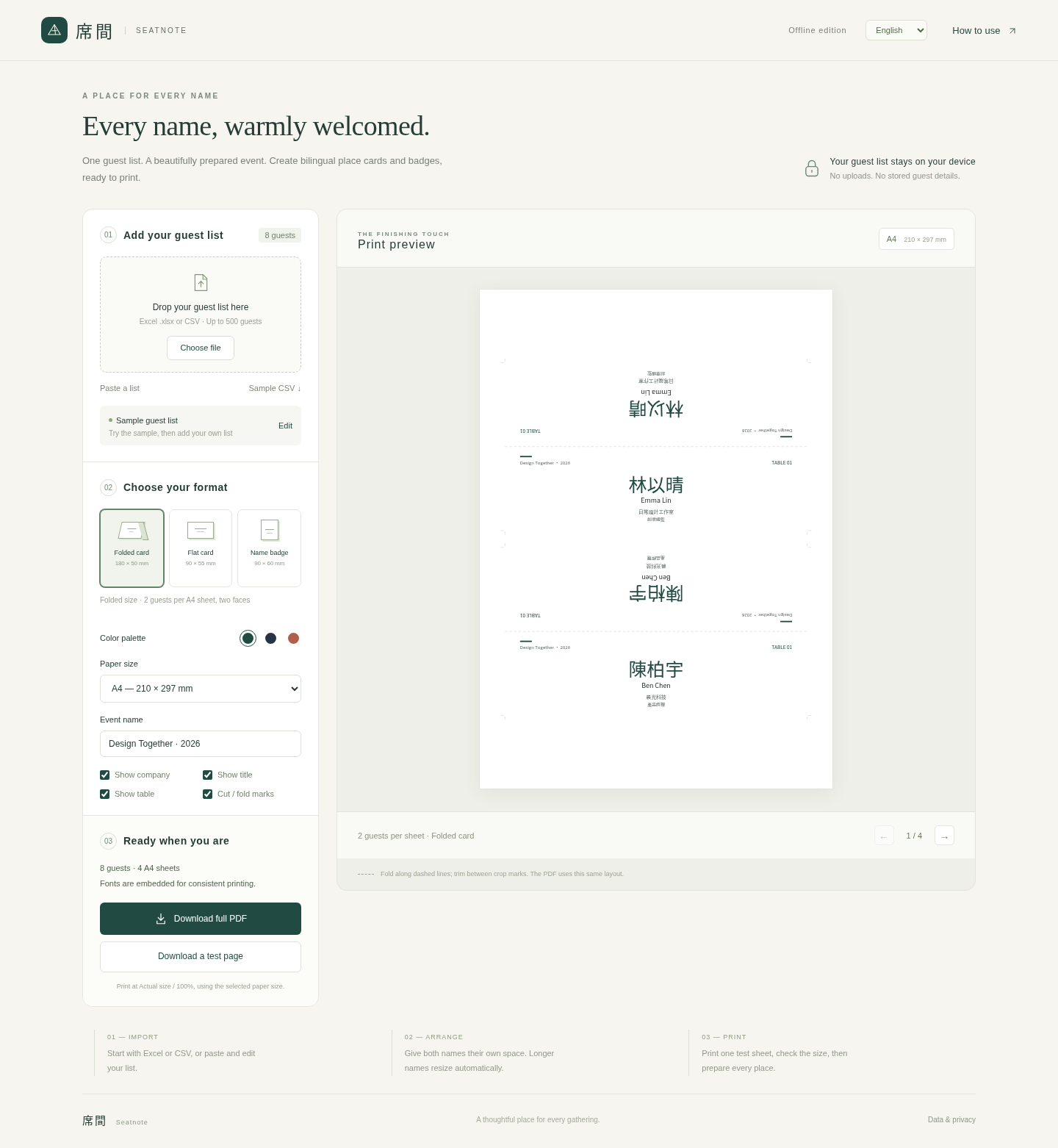
4. Print one page at 100%
Choose A4 or US Letter in the tool, then download a test PDF. Open the PDF in a PDF reader, select the matching paper size and portrait orientation, and print at Actual size / 100%. Disable Fit, Shrink and Scale to fit.
Measure the test page's 50 mm ruler. If it measures less than 50 mm, a print setting is scaling the page. Fix that setting before printing the full set. Print the downloaded PDF, rather than the browser page containing the editor.
For tent cards, the top half is intentionally upside down. Cut along the crop marks and fold along the dashed center line. Check that both sides read upright once the card is standing. Confirm that your printer's printable area does not cut off the content.
5. Keep the final PDF and the original spreadsheet
Seatnote's offline edition processes the guest list in browser memory and embeds its fonts in the PDF. It does not upload the list or save your edits after the file is refreshed or closed. Keep both your original spreadsheet and the downloaded final PDF.
The downloadable edition is intended for current desktop Chrome and Edge. A mobile mail attachment preview is not the same as a desktop browser. Before relying on any tool for an event, check it on the computer and printer you will actually use.
Read this guide in 繁體中文.